
Step 1 — Create a base line
Create the shape that will become your wave.
Steps
- New Composition (1920×1080 or 4K).
- Go to Layer → New → Shape Layer.
- Use the Pen Tool to draw a long horizontal line.
- Increase the Stroke Width (3–8 px).
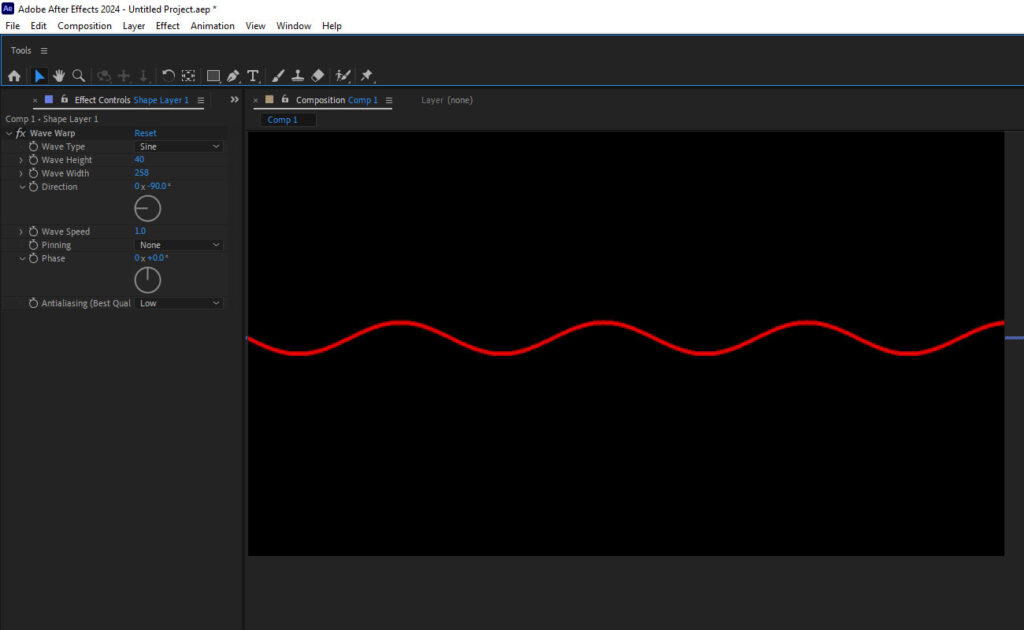
Tip: Make the line wider than the screen so the wave flows naturally.
Step 2 — Add the Wave Warp effect
Now turn the straight line into a fluid wave.
- Select your shape layer.
- Open Effects & Presets.
- Search Wave Warp.
- Apply it to the layer.
The Wave Warp effect creates animated waves across the layer automatically.
Recommended settings:
| Setting | Value |
|---|---|
| Wave Type | Sine |
| Wave Height | 120 |
| Wave Width | 700 |
| Direction | 0° |
| Wave Speed | 0.5 |
These parameters control the shape, height, and speed of the wave motion.
Step 3 — Duplicate waves for fluid motion
To create a fluid layered effect:
- Duplicate the wave layer 5–8 times.
- Change slightly:
- Wave Height
- Wave Width
- Speed
- Opacity
Example:
| Layer | Height | Width | Speed |
|---|---|---|---|
| Wave 1 | 120 | 700 | 0.4 |
| Wave 2 | 80 | 600 | 0.6 |
| Wave 3 | 150 | 900 | 0.3 |
This creates the organic flowing motion you see in modern motion graphics.
Step 4 — Add gradient colors
Now create the colorful background.
- Create a Solid Layer.
- Apply 4-Color Gradient.
Example color palettes:
Neon style
- Purple
- Blue
- Cyan
- Pink
Corporate style
- Dark blue
- Light blue
- Teal
- Soft purple
Set wave layers to Add / Screen blending mode for glowing color interactions.
Step 5 — Add glow (optional but popular)
Add:
Effect → Stylize → Glow
Settings example:
| Setting | Value |
|---|---|
| Glow Radius | 120 |
| Glow Intensity | 0.8 |
This gives the soft fluid neon look used in many tech backgrounds.
Step 6 — Animate infinitely
Instead of keyframes, use an expression.
On Wave Warp → Phase:
time*120
Now the animation moves continuously and loops smoothly.
Step 7 — Export as a stock loop
Best export settings for stock marketplaces:
| Setting | Value |
|---|---|
| Resolution | 4K (3840×2160) |
| Length | 10–20 seconds |
| FPS | 30 |
| Codec | H.264 or ProRes |
Loop the animation so the start and end match perfectly.